
Creating a Donation Page: How Your Donation Campaign Succeeds
Your association already collects donations, but so far much of it runs through contributions after Friday prayer, personal messages and individual bank transfers. Donors ask for a link they can forward, and within the board it remains unclear who assigns amounts, sends receipts and keeps track of progress. This is exactly where a verifiable process helps. When you create a donation page, every phase ends with a demonstrable result, namely a target amount, a dated test log and a documented receipt process. This way you check the page before launch, instead of discovering errors only after the first donations come in.
Table of Contents
- Define goal and campaign type before building
- Build your donation page step by step
- Write a clear donation appeal and texts
- Set up payment methods such as SEPA, PayPal and credit card
- Check technology, texts and accessibility before launch
- Secure donation receipts and transparency after donations arrive
- Publish the page and promote the launch in a targeted way
Define goal and campaign type before building
What should the page achieve by which date? A fixed target amount with an end date requires a visible deadline and a progress bar, while a permanent project page mainly needs a purpose and regular updates. Clarify this question first, because it determines the form, the texts and the payment methods.
| Campaign type | Typical goal | Suitable donation form | What the page must show |
|---|---|---|---|
| One-off project campaign (e.g. roof renovation) | fixed target amount with end date | One-off donation with three to four fixed amounts | target sum, current status, deadline |
| Permanent project page (e.g. mosque construction) | ongoing goal without an end date | one-off and recurring donations side by side | purpose, use of funds, updates |
| Time-limited campaign (e.g. Ramadan, emergency) | amount by a fixed date | quick one-off donation with recurring donation as an option | countdown, interim status, thank-you message |
Realistically plan target audience and amounts
Who donates to you regularly through Friday prayer, the community newsletter or messenger groups, and who gives once after a specific appeal? Small donors need fixed amounts for orientation, larger donors a free amount field, so you should plan for both. According to calculations by the German Central Institute for Social Issues (DZI), people in Germany donated a total of 12.8 billion euros for charitable purposes in 2023. The DZI includes donations up to 30,000 euros, while GfK only considers amounts up to 2,500 euros per year. This shows why you should not derive donation amounts solely from small online amounts.
Also decide which progress indicator the page should show, such as target sum, current status and number of donors. This way, visitors can see whether a measure is almost fully funded or whether there is still a larger gap. If you are still assessing whether collective financing suits your project, a short introduction to crowdfunding and campaign goals can help with the assessment.
At the end, note down three figures, namely the target amount, the duration and a minimum contribution that the team can manage organisationally.
Trace every later decision, for example on the number of fixed amounts or the choice of payment methods, back to these three figures. I would not approve a page as long as this information exists only verbally within the team. Record it in writing and date the document, so that later changes remain traceable.
Build your donation page step by step
The order determines whether visitors understand within a few seconds what they are giving for. This infographic shows the stages in the defined sequence, from the hero section to the thank-you page.
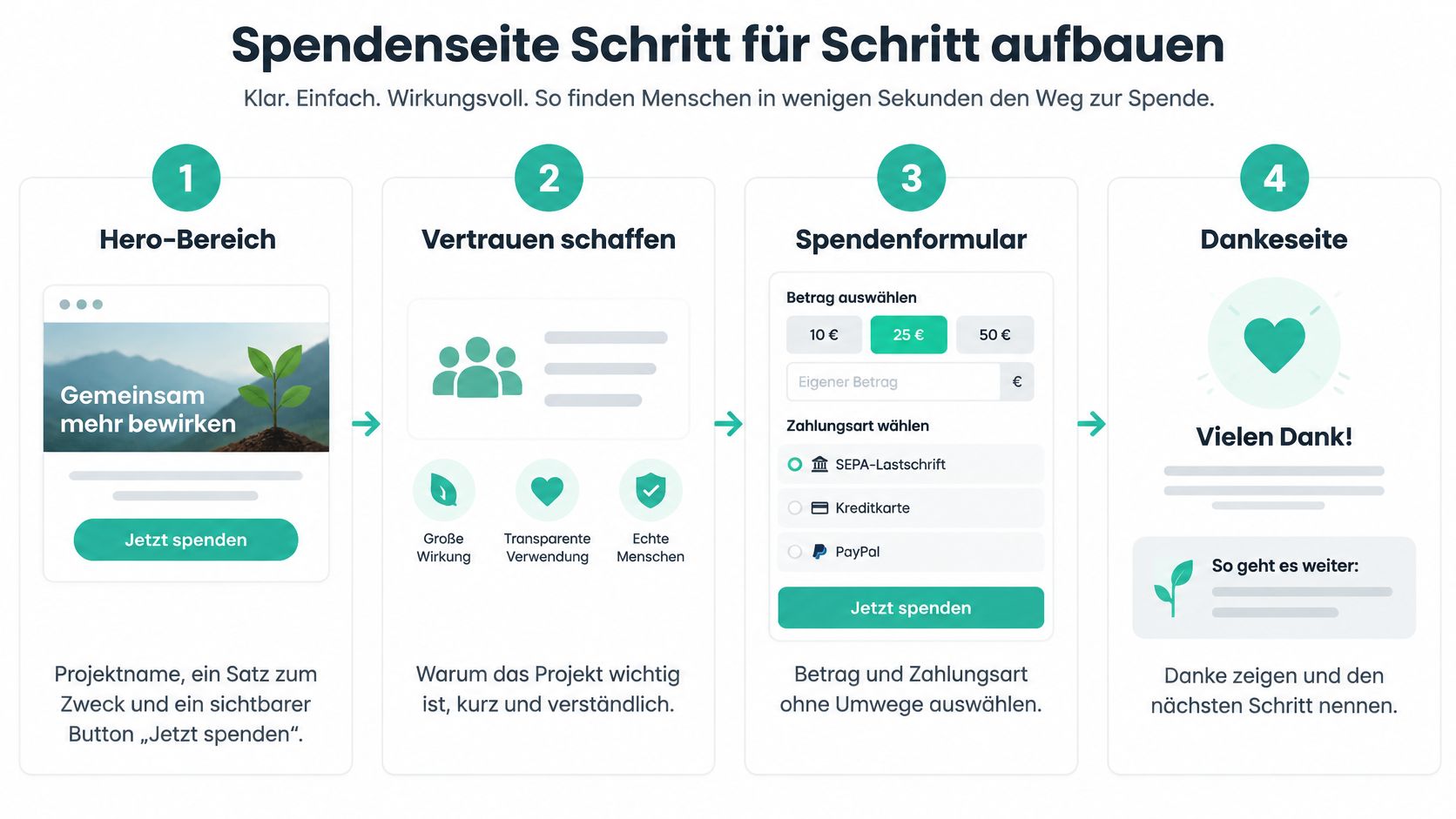
Afterwards, build each stage individually and test it on a smartphone.
- Build the hero section: Show the project name, one sentence about its purpose, and the “Donate now” button above the fold. This way, the payment path is never hidden after a long scroll.
- Structure the project description: Write three short paragraphs about the starting situation, how the money will be used, and the person or organisation responsible. This lets visitors find the required information without having to search through a long text.
- Show progress: State the target amount, the amount raised so far, and the number of donors, and update these figures at least weekly. Outdated figures quickly make a project look paused.
- Place the donation form: Offer three to four fixed amounts, a free-entry amount field, and the choice between a one-time and a recurring donation right after the progress display. Placed at the bottom of the page, the form comes too late for many mobile users.
- Add trust elements: State the organiser, proof of use of funds, and a contact option close to the form. Donors should not have to look for these points in the footer.
- Prepare the confirmation page: Thank donors specifically and announce the proof they will receive. This way, the process ends with a clear expectation.
Why is this short, mobile-friendly process worthwhile? According to the Deutscher Spendenmonitor, the donor rate reached 50.2 percent in 2024, up from 48.6 percent in 2023. The survey covered 6,039 people aged 16 to 70 questioned online, and the average donation per person was 174 euros in 2024. When about half the population donates, trust and a simple digital process are often decisive.
If you do not handle design and technical implementation in-house, Webdesign von Küstermann Media can serve as a point of contact to have the layout and mobile usability professionally reviewed. The following video visually outlines the basic structure of a donation page once more.
Writing a clear donation appeal and texts
Write the title as a benefit or goal, not as a general plea for help. “New roof for the prayer room by winter” says more than “Please support us.” Donors immediately see what outcome their gift is meant to enable and by when it is needed.
Concrete amounts instead of clichés
Concrete amounts have a stronger effect than general appeals. For example, state that a specific amount funds a precisely named service, instead of just pointing to need. In every paragraph, give one fact, namely who benefits, what the measure costs, and by when the goal must be reached.
Avoid clichés like “every donation counts” without a figure behind it. This phrase does not explain what a contribution makes possible, and it does not help undecided donors choose an amount. A short sentence stating the purpose, the sum, and the group of recipients works better.
- Use short sentences: Everyday words and a consistent form of address also help readers with little digital experience.
- Use one figure per paragraph: Cost, target sum, or deadline make the text verifiable.
- Limit promises: Only write what the project can actually deliver.
Add a sentence about the receipt right next to the form, so donors know what proof they will receive. This information belongs where they enter their name and email address, not in a hidden FAQ section. How to combine amounts, purpose, and urgency in one text is also shown in this guide on creating a donation appeal.
Simple reading rule: If a paragraph cannot be read aloud without pausing for breath or asking a question, it is too long.
Have a second person check the text for clarity before you publish it. This person should be able to repeat, without asking further questions, what the money is needed for and who is responsible. The text must match the actual use of the funds, because promises the project cannot keep damage trust more than a weak appeal.
Setting up payment methods such as SEPA, PayPal, and credit card
Payment methods determine whether a motivated visitor completes the final step. A single method, just because it is common in online retail, is not enough for a donation from a community. The overview shows, for each payment method, which type of donor uses it and what to pay attention to when setting it up.
| Payment method | Typical donors | Benefit for donors | Points to note when setting up |
|---|---|---|---|
| SEPA direct debit | Regular donors, recurring campaigns | Familiar via their own bank, ideal for recurring donations | Check IBAN field with clear labels and mandate text |
| PayPal | Spontaneous donors with an account | No need to re-enter data | Link the recipient account correctly |
| Credit card | Mobile donors, one-time donations | Fast payment in a few clicks | Make input fields and error messages accessible |
| Bank transfer | Larger individual donations | No payment via third parties needed | Provide a reference in the payment purpose field |
SEPA direct debit and bank transfer are among the most common payment methods in Germany, while PayPal and credit card tend to attract spontaneous and mobile donors. The order in the form should therefore be based on your own target audience rather than a general shop standard: a mosque construction project with regular donors can feature SEPA prominently, while a campaign aimed at a younger audience is better served by card and PayPal. At SadakaNow, payments run via SEPA, card, PayPal and Apple Pay, and the donation form transparently states which costs the payment service provider charges.
Testing two variants against each other
Test variant A with SEPA in the foreground against variant B with PayPal and card. Measure form starts, successful payments and cost per completed donation, rather than just counting clicks on the button. Evaluate amount, completion rate, payment method and repeat donations on a monthly basis so you can identify drop-off points in the funnel. Record the result as a dated log, with test amount, time and the payment method used in the tested version. Only then is the decision for a variant verifiable and not just a feeling.
- Label the SEPA field: Word labels, mandate text and error messages clearly enough that users can correct an incorrect IBAN themselves.
- Match bank transfers: Provide a unique reference in the payment purpose field so that payments can be matched to the project without needing to ask.
- Clarify fees in writing: Record with each provider which fees apply per transaction and how quickly payouts to the organisation are made.
Explain the flow of money on your page in your own words as well. SadakaNow holds donations in trust and pays them out directly to the respective organisation. Donors should be able to read this note before making a payment, because it directly answers a common question of trust, and it belongs in the same section as the receipt information.
Before adding another payment method, check the form length, the statement of purpose and the receipt notice. Long forms, unclear use of funds, and missing information about proof of donation cause drop-offs that a third or fourth method will not fix. I would only expand the payment methods once these three points have been checked off in the test log.
Checking technology, texts and accessibility before launch
The most common mistake before launch is easy to describe. Teams only check the homepage, while dynamic donation forms, error messages and payment dialogs remain inaccessible. This checklist summarises the points you therefore need to test beyond the homepage.
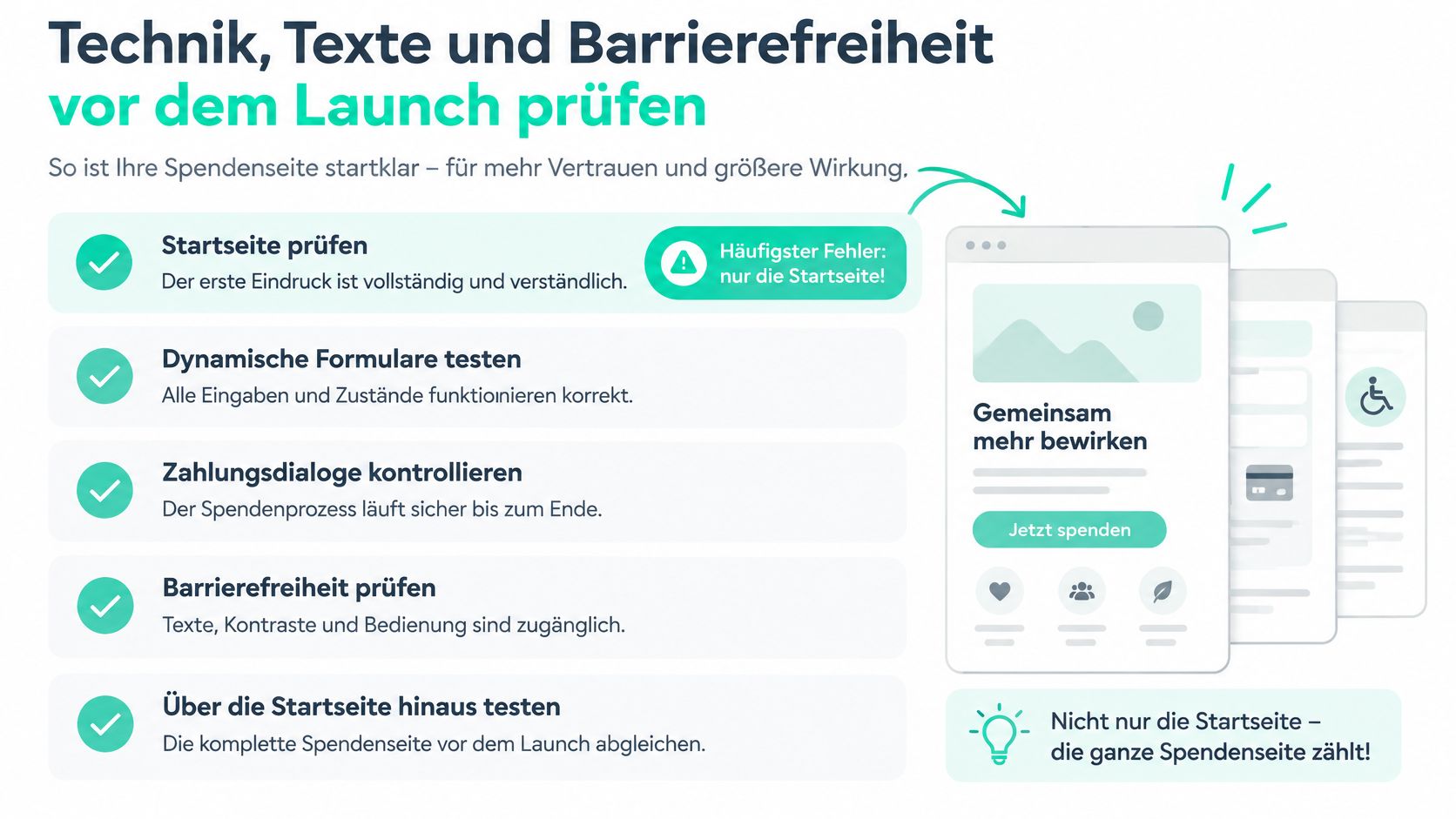
Work through the points in writing and date each test.
- Create an imprint and privacy policy: Name the specific operator and, in the case of a platform, the details of the campaign's organiser. SadakaNow, for example, is operated by MoreDonate GmbH, Carl-Zeiss-Straße 2, 33758 Schloß Holte-Stukenbrock.
- Separate consents: Configure tracking separately from the payment process and without a pre-selected optional marketing consent. Donation forms process personal and payment data and therefore need a purpose-bound architecture.
- Test keyboard and screen reader: Complete the entire form without a mouse, including the error messages. A keyboard trap in the payment dialog is a reason for abandonment, not a minor cosmetic flaw.
- Check visibility: Check alternative texts, sufficient contrast, visible focus states and understandable error messages.
- Document test cases: Document payment and receipt processes with amount, payment method and result.
- Publish a statement: Publish an accessibility statement, provided the relevant requirements apply.
Legal framework and acceptance criterion
For digital services, the Barrierefreiheitsstärkungsgesetz (Accessibility Strengthening Act) applies according to the notes from Dein Ehrenamt since 28 June 2025, with WCAG 2.1 and EN 301 549 used as the technical reference. These references help you name specific checkpoints instead of just speaking generally about accessibility. External tracking without a cleanly documented legal basis remains a separate risk here.
Test with at least three groups, namely mobile SEPA donors, PayPal users and people using screen readers. A documented test without keyboard traps, with understandable form errors and without pre-selected consent, is suitable as an acceptance criterion. Only once all three groups can complete the payment process is the page ready for the public link.
Securing donation receipts and transparency after the donation is received
The obligation to provide proof begins after the first donation, and this is where donors most often confuse three different processes. The assumption that every online payment confirmation is automatically a donation receipt is only partially correct. The table separates the proofs by purpose and donation amount.
| Proof | When sufficient or necessary | What it contains | Note |
|---|---|---|---|
| Payment confirmation | Donations up to 300 euros, under certain conditions | Amount, date, recipient | Does not replace the donation receipt |
| Donation receipt | Donations over 300 euros, regularly required | Purpose, recipient, amount, official template | May only be issued by a tax-privileged organisation |
| Check in the recipient organisation register | Before each issuance | Status of the organisation | Donors can look up the status themselves |
For donations up to 300 euros, according to the information on the recipient organisation register of the Federal Central Tax Office, a payment receipt may suffice under certain conditions; above that amount, an official donation receipt is regularly required. In the register, donors can check whether an organisation is among the tax-privileged recipients and is allowed to issue donation receipts. Machine-generated certificates can be sent as read-only PDFs, and electronic transmission is subject to its own retention periods.
Document the process in writing
Record the sequence, namely checking the status, using the official template, formulating the purpose correctly, sending receipts automatically, and storing email addresses in a data-protection-compliant way. This way, the process does not depend on a single person on the board. Also explain on the confirmation page the difference between payment confirmation, donation receipt, and tax deductibility, in line with the detailed overview on donation receipts for associations.
With us, all campaigns are checked for non-profit status before being activated. Organisations also upload project updates with photos, reports, and figures so that donors can see where their donation went. These two steps connect the tax proof with visible use and turn transparency into a repeatable process instead of a claim on the homepage.
Publish the page and promote the launch specifically
A finished page collects nothing if no one knows the link. So plan the announcement across three channels and give each channel a specific task. I would activate the community itself first, because trust and project knowledge already exist there.
- Direct outreach in the community: Mention the link, target amount, and deadline during the Friday sermon, in the community newsletter, and on a notice with a clearly legible address.
- Send personal messages: Write to regular donors by email or messenger and mention a specific fixed amount as a starting point.
- Use social media with an image: Link to the page in posts with a real project photo instead of a generic image.
Also add the link to every email signature and to your association's website. After the launch, publish progress updates with figures and photos, thank donors publicly, and show every major use of funds transparently. This way, later visitors can see that the campaign is actively managed and not just promoted on the first day.
Set up a monthly evaluation covering amount, completion rate, payment method, and repeat donations. Check drop-offs directly in the form, because only there does it become visible whether the amount, IBAN, or consent is blocking completion. Before activation, clarify in writing which checks the provider carries out and when payouts occur.
You can launch your campaign with us in under 24 hours. Questions about setting up a campaign or about partnership go to partner@sadakanow.de, issues with donations or payments go to hilfe@sadakanow.de. The concrete next step is therefore a first live campaign with a dated test log, not another round of drafting.
With SadakaNow you create a verified donation page with a clear target amount, SEPA, PayPal, and credit card, without having to piece together the flow of funds or receipt processes yourself. Bring your project online with the dated review plan from this article and show donors progress, use of funds, and the next proof right from the start.